Character Creation
Source Player Core pg. 17
Unless you're the GM, the first thing you need to do when playing Starfinder is create your character. It's up to you to imagine your character's past experiences, personality, and view of the galaxy, and this will set the stage for your roleplaying during the game. You'll use the game's mechanics to determine your character's ability to perform various tasks and use special abilities.
This section provides a step-by-step guide for creating a character using the Starfinder rules, preceded by a guide to help you understand attribute modifiers. These modifiers are a critical part of your character, and you will be asked to make choices about them during many of the following steps. The steps of character creation are presented in a suggested order, but you can complete them in whatever order you prefer.
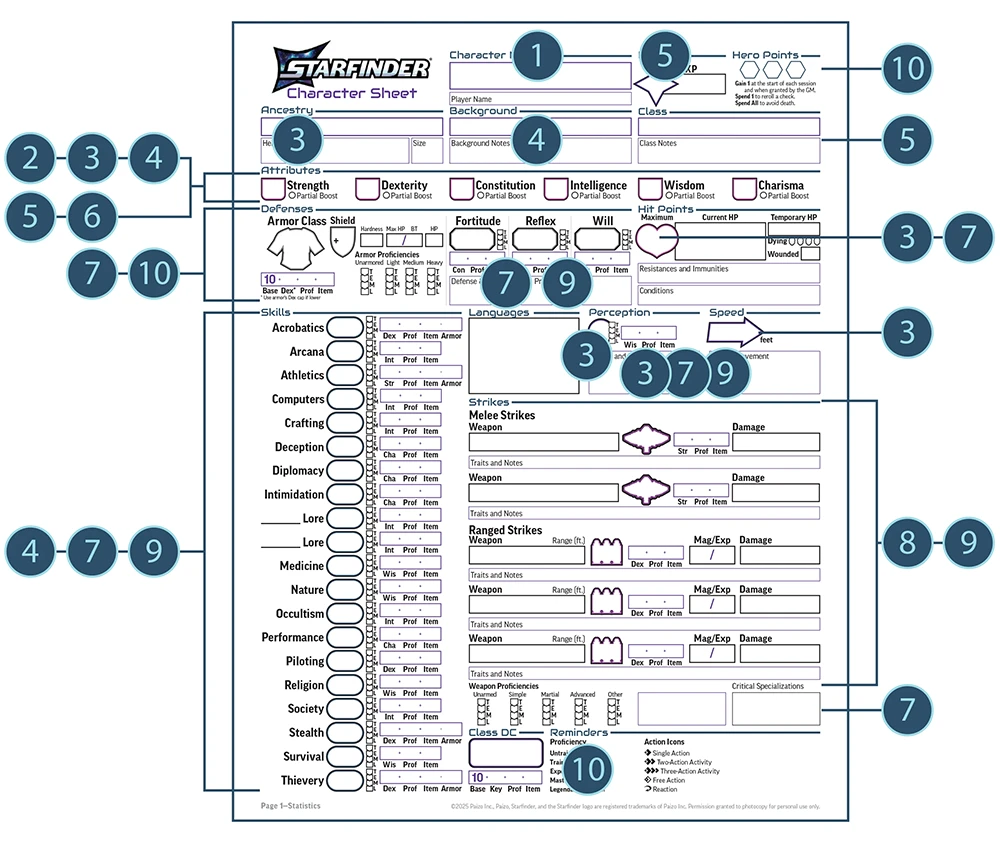
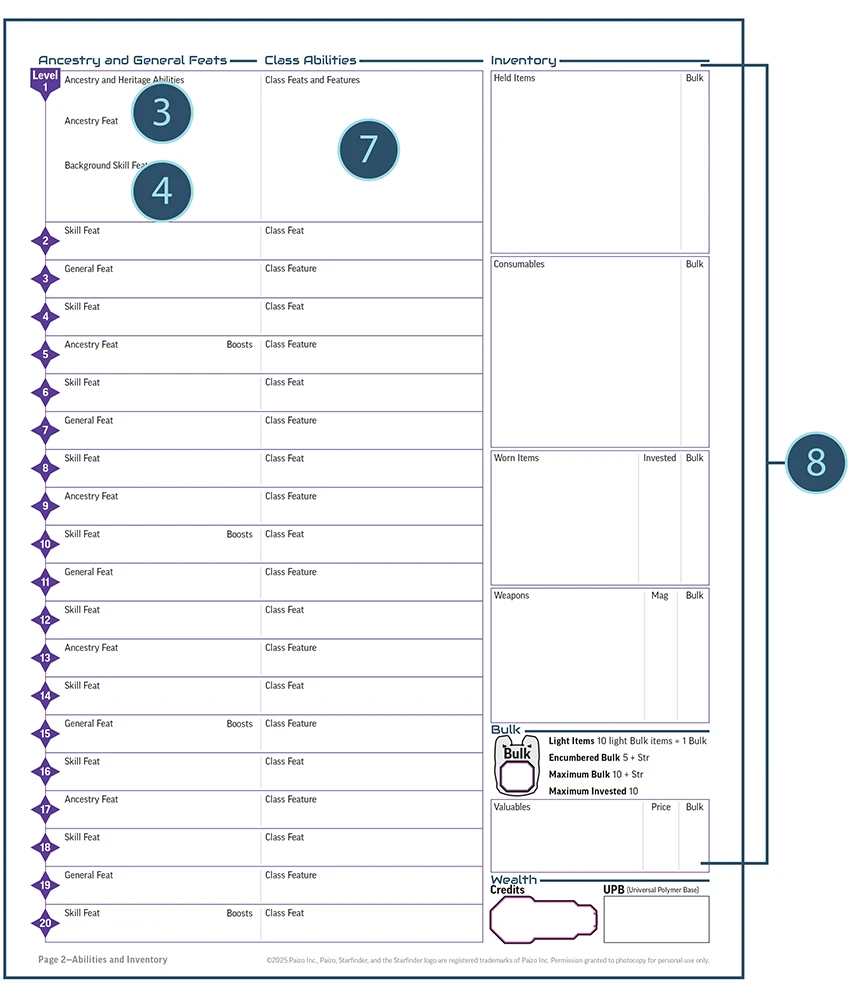
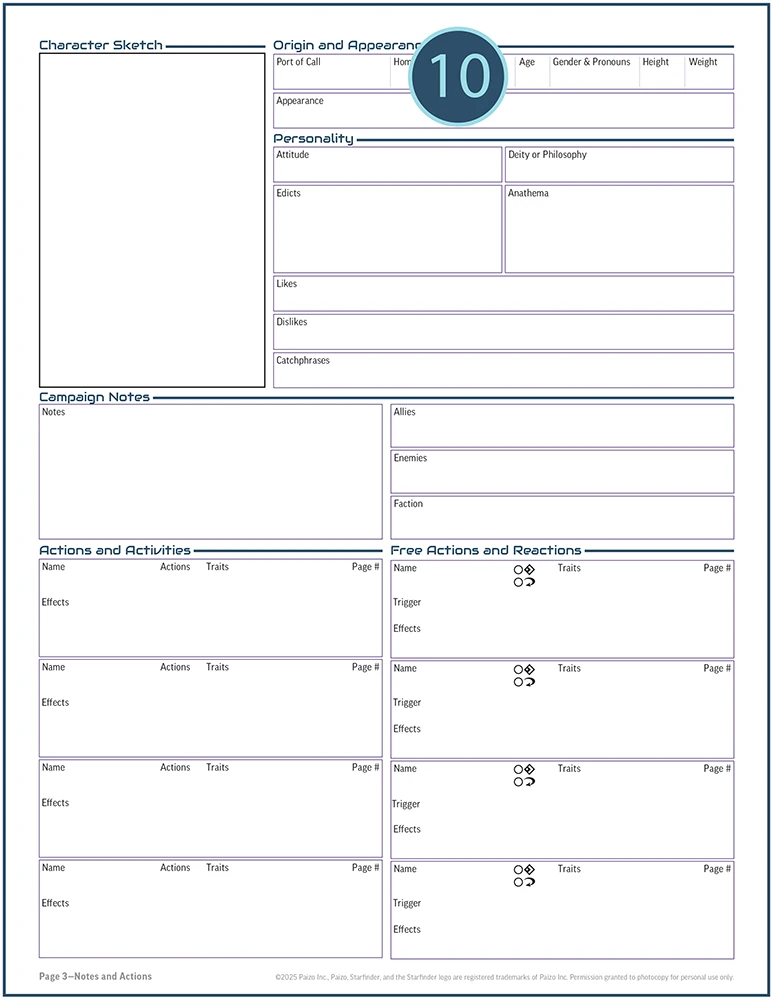
Many of the steps below instruct you to fill out fields on your character sheet. The character sheet is shown; you can find a on paizo.com as a free PDF. The character sheet is designed to be easy to use when you're actually playing the game, but creating a character happens in a different order, so you'll move back and forth through the character sheet as you go through the character creation process. Additionally, the character sheet includes every field you might need, even though not all characters will have something to put in each field. If a field on your character sheet is not applicable to your character, you can just leave that field blank.
All the steps of character creation are detailed on the following pages; each is marked with a number that corresponds to the sample character sheet shown here, showing you where the information goes. If the field you need to fill out is on the third or fourth page of the character sheet, which aren't shown, the text will tell you.
If you're creating a higher-level character, it's a good idea to begin with the instructions here, then turn to the instructions on leveling up characters.
Step 1: Create A Concept
Source Player Core pg. 17
What sort of character do you want to play? The answer to this question might be as simple as “a starship pilot,” or as complicated as “a kasatha seer raised on a generation ship far from their ancestral home world, devoted to Talavet, goddess of community and tradition.” Consider your character's personality, sketch out a few details about their past, and think about how and why they adventure. You'll want to peruse Starfinder's available ancestries, backgrounds, and classes. The summaries on Step 3 and Step 5 might help you match your concept with some of these basic rule elements. Before a game begins, it's also a good idea for the players to discuss how their characters might know each other and how they'll work together throughout the course of their adventures.
Each player takes a different approach to creating a character. Some want a character who will fit well into the story, while others look for a combination of abilities that complement each other mechanically. You might combine these two approaches. There is no wrong way!
Once you have a good idea of the character you'd like to play, move on to Step 2 to start building your character.
Ancestry, Background, Class, or Details
Source Player Core pg. 18
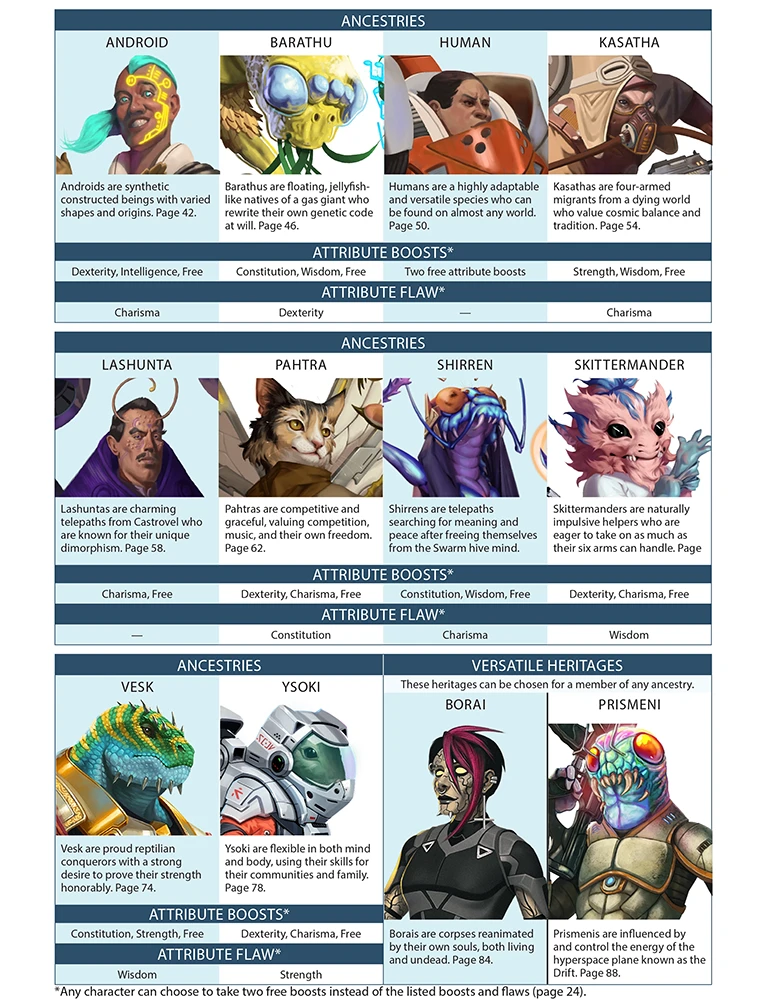
If one of Starfinder's character ancestries, backgrounds, or classes particularly intrigues you, it's easy to build a character concept around these options. The summaries of ancestries and classes give a brief overview of these options (full details appear in Chapter 2 and Chapter 3, respectively). Each ancestry also has several heritages that might refine your concept further, such as a venom thought vesk with psychic talents or one with armored scales. Some heritages, known as versatile heritages, can even be applied to any ancestry; for instance, any mortal touched by the essence of the Drift can be a prismeni, regardless of their ancestry. Additionally, the game has many backgrounds to choose from, representing your character's upbringing, hobby, or profession. Backgrounds are detailed later in Chapter 2.
Building a character around a specific ancestry, background, or class can be a fun way to interact with the galaxy's lore. For example, you could play a pacifist vesk who prefers negotiation over conflict, or a pahtra imperial spy.
Building a character around a specific ancestry, background, or class can be a fun way to interact with the galaxy's lore. For example, you could play a pacifist vesk who prefers negotiation over conflict, or a pahtra imperial spy.
Faith
Source Player Core pg. 18
Perhaps you'd like to play a character who is a devout follower of a specific deity. The peoples of the galaxy follow myriad faiths and philosophies spanning a wide pantheon, from Damoritosh, the Conqueror, god of duty, war, and ancestral patron of the Veskarium; to Eloritu, the Hidden Truth and god of history, magic, and secrets; to Oras, Agent of Change, god of evolution and transformation through science. Starfinder's major deities appear here. Your character might be so drawn to a particular faith that you decide they should be a disciple or mystic of that deity; they might instead be a lay worshipper who applies their faith's teachings to daily life, or a skeptic cursed with the church's blessing.
Your Allies
Source Player Core pg. 18
You might want to coordinate with other players when forming your character concept. Your characters could have something in common already; perhaps they are travelers from the same home world, or maybe they work together as part of the same faction. You might discuss mechanical aspects with the other players, creating characters whose combat abilities complement each other. It can be helpful for a party to include characters who deal damage, characters who can absorb damage, and characters who can heal and support their allies. However, Starfinder’s classes include a lot of choices, and there are many options for building each type of character, so don’t let these broad categories restrict your decisions.
Step 2: Start Building Attribute Modifiers
Source Player Core pg. 18
At this point, you need to start building your character's attribute modifiers. See the overview of attribute modifiers for more information about these important aspects of your character and an overview of the process.
Your character's attribute modifiers each start at +0, and as you select your ancestry, background, and class, you'll apply attribute boosts, which increase a modifier by 1, and attribute flaws, which decrease a modifier by 1. At this point, just note a +0 in each attribute modifier and familiarize yourself with the rules for attribute boosts and flaws below. This is also a good time to identify which attribute modifiers will be most important to your character; for instance, if you want to play a dashing space pirate captain, you might want to focus on a character with a high Dexterity attribute (to ensure they're good with Piloting and Stealth) who also has a bit of Charisma (to fast-talk the authorities if they get caught). See the Six Attribute Modifiers sidebar above and the class summaries for more information.
Your character's attribute modifiers each start at +0, and as you select your ancestry, background, and class, you'll apply attribute boosts, which increase a modifier by 1, and attribute flaws, which decrease a modifier by 1. At this point, just note a +0 in each attribute modifier and familiarize yourself with the rules for attribute boosts and flaws below. This is also a good time to identify which attribute modifiers will be most important to your character; for instance, if you want to play a dashing space pirate captain, you might want to focus on a character with a high Dexterity attribute (to ensure they're good with Piloting and Stealth) who also has a bit of Charisma (to fast-talk the authorities if they get caught). See the Six Attribute Modifiers sidebar above and the class summaries for more information.
Step 3: Select an Ancestry
Source Player Core pg. 19
Select an ancestry for your character. The ancestry summaries provide an overview of Starfinder's core ancestry options, and each is fully detailed in Chapter 2. Ancestry determines your character's size, Speed, and languages, and contributes to their Hit Points. Each also grants attribute boosts and attribute flaws to represent the ancestry's basic capabilities.
You'll have four decisions to make when you choosing your character's ancestry.
You'll have four decisions to make when you choosing your character's ancestry.
- Pick the ancestry itself.
- Select a heritage from those available within that ancestry, further defining the traits your character was born with.
- Assign any free attribute boosts and decide if you are taking any voluntary flaws.
- Choose an ancestry feat, representing an ability your hero learned at an early age.
Step 4: Pick a Background
Source Player Core pg. 20
Your character’s background might represent their upbringing, an aptitude they’ve been honing since their youth, or another aspect of their life before they became an adventurer. Character backgrounds appear in Chapter 2. They typically provide two attribute boosts (one that can be applied to either of two specific attribute modifiers, and one that is free), training in a specific skill, training in a Lore skill, and a specific skill feat.
Step 5: Choose a Class
Source Player Core pg. 20
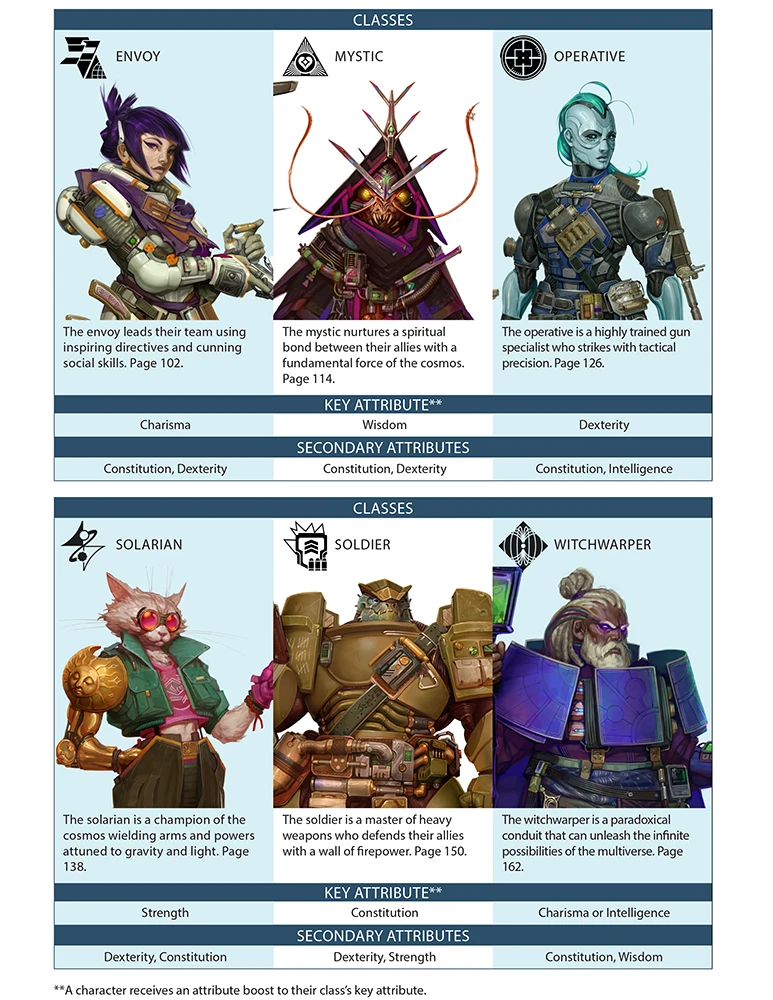
At this point, you need to decide your character's class. A class gives your character access to a suite of heroic abilities, determines how effectively they fight, and governs how easily they can shake off or avoid certain harmful effects. Each class is fully detailed in Chapter 3, but the summaries image on the right provides an overview of each.
You don't need to write down all of your character's class features yet. You simply need to know which class you want to play, which determines the attribute modifiers that will be most important for your character.
You don't need to write down all of your character's class features yet. You simply need to know which class you want to play, which determines the attribute modifiers that will be most important for your character.
Step 6: Finish Attribute Modifiers
Source Player Core pg. 21
Now that you've made the main mechanical choices about your character, it's time to finalize their attribute modifiers.
Do these two things:
Remember that each attribute boost adds 1 to the base modifier of +0, and each attribute flaw subtracts 1. You should have no attribute modifier lower than –1 or higher than +4.
Do these two things:
- First, make sure you've applied all the attribute boosts and attribute flaws you've noted in previous steps (from your ancestry, background, and class).
- Then, apply four free attribute boosts to your character's attribute modifiers. Choose a different attribute modifier for each and increase that attribute modifier by 1.
Remember that each attribute boost adds 1 to the base modifier of +0, and each attribute flaw subtracts 1. You should have no attribute modifier lower than –1 or higher than +4.
Step 7: Record Class Details
Source Player Core pg. 21
Your next step is to record all the benefits and class features that your character receives from the class you've chosen. You'll want to be sure to record the following class features.
- To determine your total starting Hit Points, add together the number of Hit Points your character gains from their ancestry (chosen in Step 3) and the number of Hit Points they gain from their class.
- The Initial Proficiencies section of your class entry indicates your character's starting proficiency ranks in a number of areas. Choose which skills your character is trained in and record those, along with the ones set by your class. If your class would make you trained in a skill you're already trained in (typically due to your background), you can select another skill to become trained in.
- See the class advancement table in your class entry to learn the class features your character gains at 1st level. You have already chosen an ancestry, background, and free attribute boosts, but these are listed in the table as a reminder. Some class features require you to make additional choices, such as selecting spells.
Step 8: Buy Equipment
Source Player Core pg. 23
At 1st level, your character has 150 credits to spend on armor, weapons, and other basic equipment. Your character's class lists the types of weapons and armor with which they are trained (or better!). Their weapons determine how much damage they deal in combat, and their armor influences their Armor Class; these calculations are covered in more detail in Step 10.
You'll also want equipment like cable line, flashlights, toolkits, and other traveling gear, and maybe even a serum or sprayflesh for emergency medical needs. Augmentations that change your body, upgrades for your armor and weapons, and magic items are pricier options that you probably won't be able to afford yet, but window shopping is free!
You'll also want equipment like cable line, flashlights, toolkits, and other traveling gear, and maybe even a serum or sprayflesh for emergency medical needs. Augmentations that change your body, upgrades for your armor and weapons, and magic items are pricier options that you probably won't be able to afford yet, but window shopping is free!
Step 9: Calculate Modifiers
Source Player Core pg. 24
With most of the big decisions for your character made, it’s time to calculate the modifiers for each of the following statistics. If your proficiency rank for a statistic is trained, expert, master, or legendary, your bonus equals your character’s level plus another number based on the rank (2, 4, 6, and 8, respectively). If your character is untrained, your proficiency bonus is +0.
Perception
Source Player Core pg. 24
Your character’s Perception modifier measures how alert they are, and is equal to their proficiency bonus in Perception plus their Wisdom modifier. See Perception for more.
Saving Throws
Source Player Core pg. 24
For each kind of saving throw, add your character’s Fortitude, Reflex, or Will proficiency bonus (as appropriate) plus the attribute modifier associated with that kind of saving throw. For Fortitude saving throws, use your character’s Constitution modifier. For Reflex saving throws, use your character’s Dexterity modifier. For Will saving throws, use your character’s Wisdom modifier. Then add in any bonuses or penalties from abilities, feats, or items that always apply (but not modifiers, bonuses, or penalties that apply only in certain situations). Record this number on the line for that saving throw.
Melee Strikes and Ranged Strikes
Source Player Core pg. 24
Next to where you’ve written your character’s melee and ranged weapons, calculate the modifier to Strike with each weapon and how much damage that Strike deals. The modifier for a Strike is equal to your character’s proficiency bonus with the weapon plus an attribute modifier (usually Strength for melee Strikes and Dexterity for ranged Strikes). You also add any item bonus from the weapon and any other permanent bonuses or penalties. You also need to calculate how much damage each weapon’s Strike deals. Melee weapons usually add your character’s Strength modifier to damage rolls, while ranged weapons might add some or all of your character’s Strength modifier, depending on the weapon’s traits. See the weapon entries in Chapter 6 for more information.
Skills
Source Player Core pg. 24
In the second box to the right of each skill on your character sheet, there’s an abbreviation to remind you of the attribute modifier for that skill. For each skill in which your character is trained, add your proficiency bonus for that skill (typically +3 for a 1st-level character) to the indicated attribute’s modifier, as well as any other applicable bonuses and penalties, to determine the total modifier for that skill. For skills your character is untrained in, use the same method, but your proficiency bonus is +0.
Step 10: Finishing Details
Source Player Core pg. 24
Now add the following details to your character sheet by filling out the boxes on page 3 of the character sheet.
Edicts and Anathema
Source Player Core pg. 24
You can choose to take on edicts and anathema to reinforce your character's beliefs and guide how they'd react in certain situations. Edicts are behaviors your personal philosophy or code encourages. Anathema are the opposite: actions contrary to your point of view and violations of your personal code. For example, you might follow an edict to keep records of any planet you visit, or you might consider it anathema to erase data or conceal information from the public.
For most characters, these are entirely optional, though it's best to consider taking some on as you create your character to hone in on how they think. If you follow a deity, you might take inspiration from the edicts and anathema listed for them on the Deities page. Ancestry entries list edicts and anathema prevalent among their communities.
For most characters, these are entirely optional, though it's best to consider taking some on as you create your character to hone in on how they think. If you follow a deity, you might take inspiration from the edicts and anathema listed for them on the Deities page. Ancestry entries list edicts and anathema prevalent among their communities.
Changing Edicts and Anathema
Source Player Core pg. 25
Edicts and anathema can change during play as a character’s beliefs evolve, or as you realize that your character’s actions reflect a different set of values than you once thought. In most cases, you can just change a relevant edict or anathema and continue playing.
Port of Call
Source Player Core pg. 25
Your character’s port of call is a place where they spend downtime between adventures or have adopted as a temporary home. This might be a world or space station they spend a lot of time on, or even a generation ship like the Idari where they currently live or often visit.
Home World
Source Player Core pg. 25
Your character’s home world is the planet, satellite, or starship where they were born or grew up. See the Planets page for more information about major locations in the galaxy where your character might be from, or make up your own!
Deity
Source Player Core pg. 25
Write down the deity your character worships, if any. Your character might worship several deities as part of a personal pantheon. You might instead choose a philosophy or decide your character is an atheist. See the Deities page for more about Starfinder’s deities.
Age
Source Player Core pg. 25
Decide your character’s age and note it on the third page of the character sheet. You can play a character of whatever age you like. There aren’t any mechanical adjustments to your character for being older, but you might want to take it into account when considering your starting attribute modifiers and future advancement. Particularly young characters can change the tone of some of the game’s threats, so it’s recommended that characters are at least young adults.
Gender and Pronouns
Source Player Core pg. 25
Characters of all genders are equally likely to become adventurers. Record your character’s gender, if applicable, and their pronouns on the third page of the character sheet.
Class DC
Source Player Core pg. 25
A class DC sets the difficulty for certain abilities granted by your character’s class. This DC equals 10 plus their proficiency bonus for their class DC (+3 for most 1st-level characters) plus the modifier for the class’s key attribute modifier.
Hero Points
Source Player Core pg. 25
Your character usually begins each game session with 1 Hero Point, and you can gain additional Hero Points during sessions by performing heroic deeds or enthusiastic gameplay. Your character can use Hero Points to gain certain benefits, such as staving off death or rerolling a d20.
Armor Class (AC)
Source Player Core pg. 25
Your character’s Armor Class represents how difficult they are to hit in combat. To calculate your AC, add 10 plus your character’s Dexterity modifier (up to their armor’s Dexterity modifier cap), plus their proficiency bonus with their armor, plus their armor’s item bonus to AC and any other permanent bonuses and penalties.
Bulk
Source Player Core pg. 25
Your character’s maximum Bulk determines how much weight they can comfortably carry. If they’re carrying a total amount of Bulk that exceeds 5 plus their Strength modifier, they are encumbered. A character can’t carry a total amount of Bulk that exceeds 10 plus their Strength modifier. The Bulk your character is carrying equals the sum of all of their items; keep in mind that 10 light items make up 1 Bulk. You can find out more about Bulk in Chapter 6.